

Game Explanation:
We have decided to create kind of uncommon mechanic for the puzzle game. “Counters”, as that was the name of the first prototype of Woolmania, had some simple counting system where the Players have to properly count and sum up the values from falling cubes. On each game level there is a counter displayed as value, i.e. 11. Players have to achieve this counter with no time limit, but also with no mistake to pass the current game level. Cubes can fall out of the screen with no penalty. Each Player can solve puzzles in own way and time manner.
Player is compering his sum result, to the previously displayed counter by swiping right on the mobile device. That is making two possible variations:
- When results are the same as displayed counter:
Player is successfully passing the game level. In such case, higher counter is generated and Player has to sum up values from cubes with increased difficulty. Highest achieved game level, together with high scores from successfully collected cubes, are saved into Player Prefabs, therefore Players can compare own scores with others; - When results are different than displayed counter:
Player has made the mistake and his sum is not the same as previously displayed counter. There is a penalty as the current game level is reset to 1 and Player has to start gaining high scores from the beginning.
Platform:
At the beginning designed for mobiles as Android and iOS. However we have already tested the possibilities for publishing as Web with mouse input and it seems to be also possible.
Game Engine:
We have decided to go with Unity Engine. We just loved it for similarity after moving out from legacy Adobe Flash where we were working on Citrus Engine.
Project Counters has a separate place in our hearts, as that was the idea which pushed for getting the knowledge about the software development processes. This project also helped us to start the carrier as Quality Assurance later on.
Creating own software product is always fascinating and provides really awarding feeling when you will manage to make little things actually working!
Game View And Strategy:
Prototyping the first game mechanic without graphics:
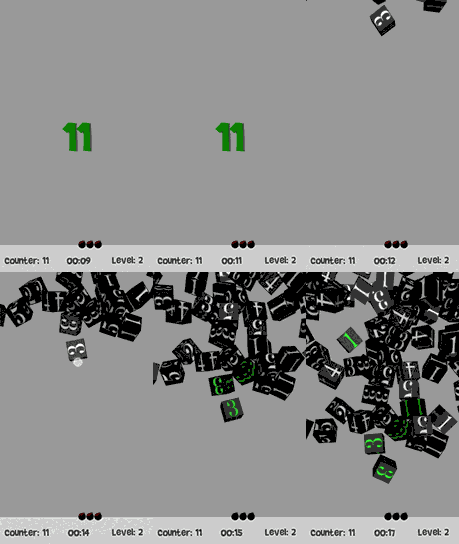

We had just focus on the core game mechanics, which were based on the 3 main objectives:
1st – Counting:
Player may use own sum up strategy to achieve the counter.
For the game, there is no difference how Player will achieve the expected counters. In example from above, when Player has to count into 11, he can sum up cubes as (3 + 3 + 3 +1 + 1) or (2 + 2 +2 +2 +2 + 1) or in any other available combination!
2nd – Memorize:
Player must remember how many values from all touched cubes are already sum up together. It looks simple, but at more advanced levels it validates the breakdown of Players attention!
3rd – Active skills:
Player must be able to use some of active skills. The first skill which has been implemented was making the reset of the current sum up values. It is helpful when Player has made the mistake and over count, or don’t remember all values from touched cubes and he would like to avoid resetting the game into the first level. For such situations there is an active skill, which was illustrated as a small bomb icon. There were 3 attempts to use this skill, and the only situation where the skill was refiled was the game reset i.e. after lose the current game level. This skill could be triggered by swiping down on the phone.
Game Mechanics:
We have decided to limit the max game level to 100. Readability for the values on cubes which are bigger than 100 drops pretty hard. This max value can be always extended later on if needed. Currently such a limit is useful for testing some game mechanics i.e. counter generator and cube values generator. We have to remember that the game level value is also very important as it is used to generate value for each cube. For example: If Player is on the level 30 then cubes are going to have values from 1 to 31.
Have a look below how the idea looks like in pseudo code:
void Awake()
{
  currentGameMaxLevel = 100;
  currentGameLevel = 1;
  SetCubeValues(Random.Range(1, currentGameLevel + 1));
}

void Start()
{
    if(PlayerSuccesfulPassGameLevel)
  {
    UpdateHighScores(Pass);
    if(currentGameLevel>currentGameMaxLevel)
    { currentGamelevel += 1;
      SetCubeValues(Random.Range(1, currentGameLevel + 1));
      CreateAndDisplayNewCounter();
    }
  } else
    {
      UpdateHighScores(Fail);
      currentGamelevel = 1;
      CreateAndDisplayNewCounter();
      RestartGame();
    }
}

void CreateAndDisplayNewCounter()
{
    int MIN = currentGameLevel;
    int MAX = currentGameLevel * 2;

    int getCounter = app.getModel().getDataModel().getGlobalCounter();
    int randomRange = Random.Range(getCounter + MIN, getCounter + MAX);

    app.getModel().getDataModel().setCounter(randomRange);
    DisplayCounter();
}
Object Oriented Programing:
Once you have started to write some real code, there is a good time to step away for a minute and think about the code architecture. It is necessary to create a complex project and very helpful for all kind of software projects. The main purpose for using some of code architecture is to gain the possibility for manipulation with application stages. On our game example, we are going to “separate the time” into stages as OnGameStart, OnGameWin, OnGameLose, OnGameRestart. Those stages are written in the code as events and we are able to trigger those per wish. It is wise to create the controller for the application, where we can type some real functionalities for those stages.
Don’t worry if these topis are unfamiliar to you. We are going to provide more information about Object Oriented Programing and Model View Controller architecture in incoming posts.

 Dev Blog